


 Gudangnya Software - pada kesempatan kali ini saya akan share software converter, namanya adalah Any Video Converter Ultimate 4.3.1, beberapa hari yang lalu saya juga pernah posting yang professional. lalu pastinya sobat gudangnya Software bertanya kan?? apa sih perbedaan ultimate dari professional?
perbedaanya terletak pada hasil dari peng-convertanya. lebih jernih ultimate dari professional, selain itu suaranya juga lebih jernih. ada yang baru lagi sob... bisa me-RIP DVD juga lho...
selain itu ada fitur barunya, bisa dilihat dibawah ini sob..


 Convert a wide range of video formats and watch any video and DVD on the go!
- Rip DVD and DVD folder to video formats
Rip DVD to iPod, DVD to MP4, DVD to AVI, etc. DVD disc and DVD folder are supported. The DVD Ripper rips DVD to AVI, WMV, MP4, MPEG-1, MPEG-2, FLV, SWF, MKV, 3GP and 3G2 for portable media players and mobile phones are available. Smart DVD structure analyzing feature helps to rip copy protected DVD movies directly. Chapter, audio language, subtitle and angle options are available. Rip DVD into a single file or separate files by titles.
- Convert video between different formats
Convert all kinds of video formats, including MOV, M2TS, OGM, RMVB, RM, WMV, QT, FLV, MOD, TS, TP, DVR-MS, Divx, etc. to AVI, WMV, MP4, MPEG-1, MPEG-2, FLV, SWF, MKV, 3GP and 3G2 for all kinds of portable media players including iPod, iPhone, PSP, Amazon Kindle Fired, Samsung Galaxy S II, android mobile phones including Google Nexus One, BlackBerry and Nokia and game consoles including PS3, Xbox360 and Wii. Click HERE to learn about the supported input formats and click HERE to learn about the supported output devices.
- Extract audio from videos
Convert video to audio formats including MP3, WMA, M4A, OGG, WAVE and AAC.
- High-Definition video converter
Served as a high-definition video converter, Any Video Converter Pro. allows you to convert AVCHD (*.M2TS, *.MTS, *.TOD), HD MKV, HD H.264/MPEG-4 AVC, HD MPEG-2, HD MPEG Transport Stream (*.TS, *.TP, *.M2T) and other high-definition video formats to standard definition video formats. Besides, high-definition video output formats including AVI, WMV, MP4 and MKV (720P & 1080P) are also available.

RECORD VIDEO AND CAPTURE DESKTOP ACTIVITIES
Record any local and online videos, create video tutorial with ease
- Perfect video recorder with high output quality
 Any Video Converter Ultimate is not only a video and DVD converting tool, but also a powerful yet simple screen recorder program. It performs perfectly in recording any local and online videos (such as YouTube, Nico, Yahoo, iTunes, Google, Metacafe...) with high output audio and video quality.
- Create video tutorials by capturing desktop activities
Any Video Converter Ultimate is also a good tool for you to create video tutorials, demonstrations and presentations. It can record and capture all the desktop activities.
ENJOYING YOUTUBE VIDEOS
Fully enjoy fun of YouTube videos around the world with a few clicks

- Built-in YouTube video downloader and YouTube video converter
 Paste URL links of your favorite YouTube videos to the program, download to your hard drive and convert to video formats you need. Downloading only or downloading and converting are available. YouTube login feature is also built-in.
- Choose YouTube video quality
YouTube videos are now available in a range of quality levels (Read details...). The video converter allows you to specify the quality level by menu Edit > Option > Online Video.
- Additional online video sharing site support
Besides, the program can download and convert videos from Google Video and Japanese Nico Video.
- Add "Flatten and add Faststart to MP4 files" to enable MP4 streaming
This program adds the MP4 Faststart option to play back MP4 video in the stream way. With this function, you can upload the converted MP4 videos to the online video-sharing websites such as YouTube. While the video has been uploaded to the website, the video can be played before the entire video will be downloaded.

EDITING VIDEOS EASILY
It's an easy job to personalize videos and make them special and different
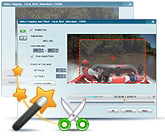
- Merge multiple files into one
Despite the formats of the videos, you can merge multiple video files into a singe long video.
- Clip any segments as you like
Help you to clip multiple segments in a video by setting start point and end point as you like. Or trim a section of the video by setting start time and end time.
- Crop frame size to remove black bars
Crop frame size to remove black bars and retain what you want only. You can either use intuitive drag-and-drop cropping window or set crop area size, left margin and top margin to achieve the goal.
- Personalize your video with special effects
Adjust the brightness, contrast, saturation, rotate or flip your video, add artistic effects like noise or sharpen to make your video different and special.
- Add your own subtitle to output video
Prepare a .srt subtitle with your own dialogue and embed it into output video, set encoding, position, size and font for your own subtitle.

BURNING VIDEO TO CD/DVD/BLU-RAY DISC
It's an easy job to burn your desired videos to CD/DVD/Blu-ray disc
- Choose DVD output format
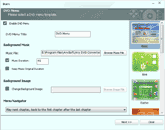 You can unfold Output Profile, choose Burning to DVD from the list, and then choose DVD video NTSC Movie or DVD video PAL Movie according to your TV system.
- Customize your CD/DVD as you like with DVD Menu
You will be prompted to choose DVD menu when the program finishes video conversion process. You can customize your CD/DVD as you like. Such as name your CD/DVD in DVD Menu Tile, browse music file from your local computer for your DVD in Background Music,change your DVD's background image in Background Image and etc.
- Support burn video to multiple playable DVD formats
The program supports burning video to CD-R, CD-RW, DVD-RAM, DVD+R, DVD+RW, DVD+R Dual Layer, DVD-R, DVD-RW, DVD-R Dual Layer, random access writes, Blu-ray media, Blu-ray Rewritable media.
- Easy to use
Just with a few clicks, you can burn your desired videos to CD/DVD, so you can save or enjoy the videos freely!

EASIER OPERATION AND MANAGEMENT
Save your time and energy and get better conversion experience
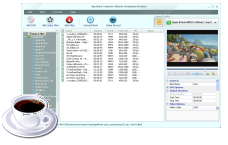
- Unique output video management panel
Manage your output videos by profile or group with a file calculator. Show or hide the file management panel in one click.
- Unique output profile management panel
Disable or enable any output profile as you like. Keep your commonly used profiles in the front.
- Batch video adding and converting
Batch add video files in different folders easily with a folder selection dialog. Batch convert video files to output profile you specified and auto shutdown after encoding is also available. Take snapshot from playing video and save as .PNG picture format, create your own picture collections from movies.
- Completely customizable parameters
Embed useful pre-defined options to choose and completely customize frame size, video bitrate, audio bitrate by manually entering a value.
- Process priority and multi-processing
Set process priority from idle to realtime, support multi-processing from 0 to 8, offer you best speed to convert videos.
- Multilingual user interface
User interface of Any Video Converter Pro. covers 20 languages including English, Germany, French, Japanese, Simplified Chinese, Traditional Chinese, Arabic, Spanish and Portuguese.
- Fast conversion speed with NVIDIA CUDA:
Support for NVIDIA CUDA acceleration technology, which provides you high converting speed to save time and energy while ripping DVDs.
pastinya sobat gudangnya software pengen mencobanya buakan?? langsung download saja sob.... semuanya GRATIS jika di download di Gudangnya Software.
Password : www.pusatgudangsoftware.tk or gudangnyasoftware
Download Any Video Converter Ultimate 4.3.1 Installer
Download Any Video Converter Ultimate 4.3.1 Crack only


